
How hard can it possibly be to record a helicopter flying across Altis and play it back?
On paper, it sounds like an afternoon’s work. You set up a loop, record the helicopter’s position into an array twenty times a second, spawn a duplicate helicopter when the run finishes, and shove it along the recorded coordinates. Simple.
In reality, what follows is a slow descent into Euler angles, scheduler contention, phantom rotor collisions, and helicopters that look like they’re being dragged through treacle on a fishing line.
When I started building the replay system for the LZ Trainer, I broke just about every rule in the book before stumbling across the right way to do it. If you want to record vehicle movement in Arma 3 — whether for an action replay or a cinematic camera — here is a practical foundation for recording helicopter telemetry and playing it back. The small example below isolates the recording and movement code; the trainer also has separate systems for cameras, collisions, rotor animation, and replay cleanup.
Think of the recorder as taking notes, not filming a video. Each note saves when it was taken, where the helicopter was, which way it was facing and leaning, and how it was moving. During replay, a duplicate helicopter — the ghost — is moved using those notes. No AI pilot flies the route again.
There are three jobs: save useful notes while you fly, fill the gaps between them during replay, and remove the ghost when you finish. I’ll call a saved note a sample. A render frame is one picture drawn by the game. They are not the same thing: the game may draw several pictures between two saved samples.
Mistake No. 1: Compass direction is for boats
My very first prototype recorded two things: getPos and getDir.
If you’ve ever tried that on a helicopter, you already know the comedy that ensued. getDir returns a
single compass heading (0 to 360 degrees). It tells you which way the nose is pointing horizontally,
and absolutely nothing else.
Replaying that heading with setDir cannot reconstruct the recorded bank or pitch. The duplicate’s
own simulation may still tilt it, but that movement does not tell you what the original pilot did.
You need to record the aircraft’s full orientation.
A helicopter in flight moves in three dimensions simultaneously: pitch, roll, and yaw. To capture that
in Arma, you have to throw getDir in the bin and use vector directions:
// What you actually need to record for orientation:
private _dir = vectorDir _heli; // Facing vector [x, y, z]
private _up  = vectorUp _heli;  // Roof vector [x, y, z]
vectorDir tells the game engine where the nose is pointing in 3D space. vectorUp tells it which way
the top of the rotor mast is pointing. Together, they define the exact roll and pitch of the airframe.
When it comes time to play that back on your ghost helicopter, you apply them in one clean shot:
_ghost setVectorDirAndUp [_dir, _up];Those vectors let you restore the recorded bank and pitch as well as the heading.
Mistake No. 2: The coordinate trap
The next trap is getPos and setPos.
Arma’s position commands use different reference surfaces for height:
getPosmeasures above the surface underneath the object, which can include a roof or another object.getPosATLmeasures above the terrain, including the seabed under water.getPosASLmeasures above a fixed sea-level reference.
Bohemia specifically warns that getPos has no directly compatible setter, so
_ghost setPos (getPos _heli) is not a reliable way to copy a flight position.
See the getPos reference and
position formats.
Recording an ATL position and restoring it at the same coordinates can preserve the original world position. The difficulty comes when interpolating between samples: terrain height at the intermediate point need not match a straight blend of the heights at the endpoints. Interpolating ATL heights can therefore bend the replay path as it crosses uneven terrain.
For this recorder, use Above Sea Level (ASL) throughout:
private _posASL = getPosASL _heli;
// ... and in playback:
_ghost setPosASL _posASL;
ASL gives every sample the same vertical reference. Interpolation still approximates the path between samples, but terrain changes no longer alter that reference.
Mistake No. 3: The sleep lie (Scheduler drift)
Now you need a loop to record the data. The obvious, intuitive way to write this in SQF is a spawned
script with a sleep:
// The naive recording loop -- DON'T DO THIS
[] spawn {
    while { recording } do {
        telemetry pushBack [time, getPosASL myHeli, vectorDir myHeli, vectorUp myHeli];
        sleep 0.05; // 20 times a second, right?
    };
};
sleep 0.05 specifies a minimum wait, not an exact sampling interval. Frame rate and the budget
for scheduled scripts can both delay the next iteration. In a busy mission, the gaps may be much
larger than the requested 50 milliseconds.
Worse, it stretches most precisely when the action is heaviest — exactly when you’re taking evasive action, pulling hard on the cyclic, and flaring between buildings under fire. Your recording ends up with wide, erratic gaps right through the most critical part of the flight.
The fix is to get out of the scheduled environment completely and hook into the render loop using
addMissionEventHandler with the
EachFrame event:
private _recordedHeli = vehicle player;
if (!(_recordedHeli isKindOf "Helicopter")) exitWith {
    hint "Enter a helicopter before recording.";
};

my_recordedFrames = [];
my_recordLastTime = -1;
my_sampleInterval = 0.05; // Target interval in simulation seconds

my_recordHandler = addMissionEventHandler ["EachFrame", {
    _thisArgs params ["_heli"];
    if (isNull _heli || { !alive _heli }) exitWith {
        removeMissionEventHandler ["EachFrame", _thisEventHandler];
    };
    private _now = time;
    if ((_now - my_recordLastTime) < my_sampleInterval) exitWith {};
    my_recordLastTime = _now;

    my_recordedFrames pushBack [
        _now,
        getPosASL _heli,
        vectorDir _heli,
        vectorUp _heli,
        velocity _heli
    ];
}, [_recordedHeli]];
The helicopter reference is captured once and passed into the handler. Getting out or entering another vehicle will not change which aircraft is recorded. This short snippet illustrates the sampling loop; the complete example below adds start and stop controls.
EachFrame avoids the scheduled-script budget, but it only offers one sampling opportunity per
frame. At 15 FPS and normal simulation speed, it cannot produce 20 distinct samples per second.
Long frames and interval rounding can reduce the rate even when average FPS is higher.
Store each sample’s actual timestamp, and keep the handler short: expensive unscheduled code can
hold up the game. See Bohemia’s scheduler guide.
The tickTime gotcha
Use the same clock to throttle samples, timestamp them, and advance this example’s playback.
Here that clock is time, the mission’s simulation time. A simulation pause therefore pauses
the replay timeline too, and time acceleration affects it along with the rest of the mission.
diag_tickTime measures elapsed real time and continues during a simulation pause. It can be a
deliberate choice for a replay with its own clock, but then pause and playback speed need explicit
handling. Mixing clocks without that handling can let sampling and playback drift apart.
See time and
diag_tickTime.
The recorder below accepts only increasing timestamps. It never invents extra samples to fill a long frame: interpolation cannot recover a manoeuvre that was never recorded.
Mistake No. 4: The dead plastic toy (Physics vs. Simulation)
Once you have your recorded frames, you need a “ghost” helicopter to play them back.
You spawn a duplicate helicopter at the start point. But what do you do with its physics?
- With simulation disabled: Normal engine and rotor behaviour may stop. You can move the model by script, but convincing animation and audio become separate work. Disabling simulation is not a general promise that the object’s geometry can no longer obstruct anything.
- With simulation enabled: The aircraft keeps running its own simulation between scripted updates. Gravity, contacts, and other forces can interfere with the replay.
An invulnerable simulated vehicle is one starting point:
private _ghost = createVehicle [typeOf _originalHeli, _startPosATL, [], 0, "FLY"];
_ghost allowDamage false;     // Prevents normal damage, not collisions
_ghost setDamage 0;
_ghost setFuel 1;
_ghost enableSimulation true; // The aircraft still runs its own simulation
_ghost engineOn true;
allowDamage false neither disables collisions nor stops the ghost pushing other objects.
Scripted damage commands can also bypass it. See
allowDamage.
Arma 3 2.18 added setPhysicsCollisionFlag. Setting it to false disables PhysX and geometry
collisions, but roadway interactions remain. The example below uses it as a limited collision
precaution; it does not make an actively simulated helicopter a perfectly isolated visual object.
Its suitability still needs checking with the chosen aircraft and scene. See
setPhysicsCollisionFlag.
Velocity is useful telemetry too, and can be applied alongside the pose:
_ghost setPosASL _pos;
_ghost setVectorDirAndUp [_dir, _up];
_ghost setVelocity _velocity;
setVelocity sets movement velocity. It does not reconstruct engine RPM, rotor speed, collective,
damage state, or sound and particle effects. Those need their own recording or presentation logic.
Starting the engine immediately before replay also does not guarantee that the rotor is already up to speed. The trainer has a separate rotor preparation stage; this teaching example does not. An airborne recording can therefore start with visibly slow rotors. Preparing the aircraft away from the course before revealing it is one approach, but rotor behaviour varies between models.
The Secret Sauce: Smooth Interpolation (Lerp)
Imagine watching your landing from a fixed camera beside the helipad. The recording contains a position just before the helicopter reaches a painted line, and another just after it. What should the ghost do while the replay clock is between those two moments?
If your script only copies the last saved position, the ghost stays there until the next sample is due, then jumps ahead. Repeat that all the way down the approach and the helicopter stutters. Updating its position 20 times a second still leaves visible steps if the game is drawing 60 or more frames a second. Its own physics may move it between those updates too; that is not a substitute for following the recorded flight.
Instead, put the ghost partway between the two saved positions on every render frame. Halfway through the time gap? Put it halfway along the gap. Nearly at the next sample? Put it nearly there. That is linear interpolation, usually shortened to lerp.
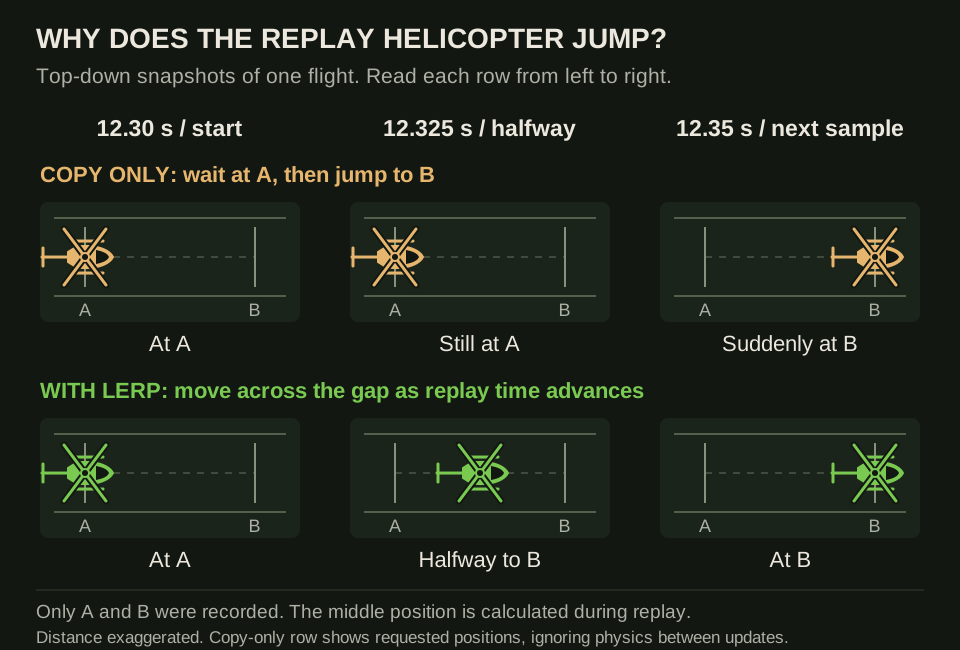 Read each row from left to right: it is the same helicopter at three replay times, not three helicopters in one scene. The top row shows the positions requested by a copy-only script; the bottom row fills the gap. Distances are exaggerated so the difference is visible.
What does that look like in numbers?
Say two samples are 0.05 seconds apart and the helicopter travels one metre between them. For this example, it is flying straight and level; only its east/west coordinate changes.
- At 12.30 seconds, sample A says that coordinate is 100 metres.
- At 12.35 seconds, sample B says it is 101 metres.
- At 12.34 seconds, 0.04 of the 0.05-second gap has passed: 80%.
So the ghost belongs 80% of the way from 100 to 101: 100.8 metres. It does not wait at 100 and then leap straight to 101. The next render frame gets its own answer from its own replay time.
The code calls that fraction _alpha. It is just a progress value: 0 means sample A,
0.5 means halfway, and 1 means sample B. It is not a speed setting and it does not stay at
80% for the whole replay. It starts again for each new pair of samples.
// Example values for ONE moment during playback:
private _timeA = 12.30;
private _timeB = 12.35;
private _replayTime = 12.34;

// Time since A / total time between A and B = 0.8 (80%).
private _alpha = (_replayTime - _timeA) / (_timeB - _timeA);

// Start position + 80% of the distance to the next position.
private _eastWest = 100 + (101 - 100) * _alpha; // 100.8 metres
A real position has three coordinates: east/west, north/south, and height. Apply the same fraction to all three and the ghost moves along a straight line from A to B. Close-together samples make lots of short straight sections that follow the recorded route. If the recorder misses a sharp turn, lerp will cut across that missing detail; it cannot know where the helicopter really went.
Making the helicopter turn and bank as well
Moving the ghost smoothly is only half the job. If you still copy its nose direction and bank straight from the last sample, it can slide smoothly while its body snaps from one angle to the next. We need in-between values for those too.
You do not need to write all those calculations yourself. Arma’s
setVelocityTransformation
command takes the two saved states and the progress fraction, then applies the blended result:
// A and B are the saved samples either side of the current replay time.
_ghost setVelocityTransformation [
    _posA, _posB, // Where the helicopter was (ASL coordinates).
    _velA, _velB, // How it was moving (velocity).
    _dirA, _dirB, // Where its nose was pointing.
    _upA,  _upB,  // Where its roof was pointing: this captures bank too.
    _alpha       // How far to blend from A towards B, from 0 to 1.
];
Call it on every render frame, with the right pair of samples and the current fraction. One call does not start an animation that runs by itself. This is the command used near the bottom of the complete example. Despite its name, it sets position and orientation, not just velocity. Bohemia notes that the velocity part has limited effect in single-player; it does not recreate rotor speed or engine behaviour.
What about slerp? A refinement for turning
You do not need to implement slerp to follow or use this example. The example uses the linear blending command above. With small changes between samples, that can give a convincing replay. Slerp is worth understanding if a fast turn or roll still looks uneven.
The issue is that blending the numbers in a direction vector is not quite the same as turning the helicopter by an equal angle each frame. With a large change between samples, the blended direction can turn slowly at first, faster through the middle, then slowly again — even when the replay clock is advancing evenly. That can make a replayed turn look as though the pilot briefly pushed harder on the pedals, when the change actually came from the blending method.
Slerp is short for spherical linear interpolation. For rotations, think of it as turning the helicopter through equal angles in equal amounts of time between two saved orientations. It follows an arc through possible directions instead of taking a straight shortcut between direction-vector tips. The useful result here is a steadier turn, not a different flight path.
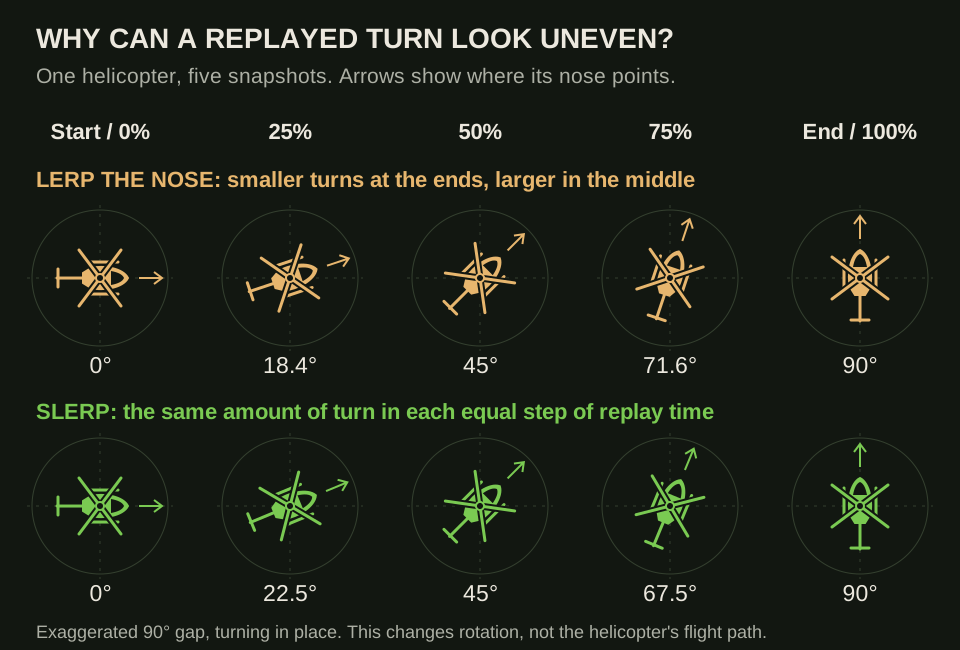 Each column is an equal step in replay time. These are repeated views of one helicopter turning in place to isolate the effect on its nose direction. A 90° gap is deliberately exaggerated; ordinary close-together samples should differ much less. The labels show degrees turned from the starting direction, not Arma compass headings.
For a helicopter that is also pitching and banking, quaternion slerp handles the full orientation together. A quaternion is simply another way to store a 3D rotation; you do not need to learn its maths for the code below. Using it would mean converting the saved direction and up vectors to that form, blending the rotations, then converting back. The slerp reference describes the constant-rate, shortest-path rotation between each pair.
There are limits: independently blending nose and roof vectors can also change their lengths and the right angle between them. Quaternion slerp avoids that particular problem, but neither method can recover an unrecorded manoeuvre. And a steady rotation between two samples does not guarantee a steady rotation across the whole flight — the pilot may genuinely have changed rate.
For this article, remember lerp fills the position gaps; slerp is an optional improvement to
how orientation is blended. setVelocityTransformation uses linear blending, not quaternion
slerp. It does not make a curved flight path for you.
Which two samples do we use next?
During normal forward playback, keep a bookmark in the saved list. If the replay time is between samples 20 and 21, use those. Once it reaches sample 21, move the bookmark forward. After a slow game frame, you may need to pass several samples to catch up with the clock.
The complete example calls this bookmark _index. It finds A and B, works out _alpha, and
moves the ghost. That is the whole playback loop; the rest is setup and cleanup. A seek bar would
need to find a new pair after a jump, but this example only plays forwards, so we can leave that
extra search code out.
Putting it together: an Eden single-player example
This example records one helicopter and moves a duplicate along the captured path. It targets
Arma 3 2.18 or later because it uses setPhysicsCollisionFlag.
You can also get the complete demo mission and source code on GitHub.
The repository includes the ready-made Eden scenario and its init.sqf, with a README explaining
how to install and run it. Use that version if you want to try the demo without setting up the mission yourself,
or follow the steps below to build it from scratch.
How to read the script
The script is long because it also has to deal with starting, stopping, a destroyed helicopter, and deleting the ghost. The part that actually moves the replay is much smaller.
The numbered comments divide it into six jobs: setup, cleanup, saving a sample,
recording controls, playback, and action-menu buttons. On a first read, follow
REC_fnc_sample to see what is saved, then section 5c to see how two samples move the ghost.
REC_frames is just the list of saved samples, despite the name.
Each sample is an SQF array with five entries. Arrays start counting at 0, so _a select 1
means “the position stored in sample A”, not “sample number 1”. The index key is repeated inside
the script beside the recording code.
Three SQF details explain some of the less obvious lines:
- An event handler is code Arma calls for you — here, once per render frame. It cannot remember
the private variables from the function that created it. The list at the end of
addMissionEventHandlerpasses what it needs;_thisArgsreads that list back inside it. - Keep the number returned when you add a handler. You need it to switch that handler off later.
Inside the handler itself,
_thisEventHandlergives you its own number.EachFramedoes not supply that number as an ordinary event parameter. EachFrameruns unscheduled: it must finish without pausing forsleep. To leave the last replay image visible briefly, save a deletion time and check it on later frames instead.
At the end, the example applies the final recorded pose and disables the ghost’s simulation to hold it still, including its rotor animation. It keeps this final snapshot visible for two simulation seconds, then removes the ghost. The delay starts when that pose is applied, so even a long frame that overshoots the replay duration will not skip the final snapshot.
These behaviours are documented under addMissionEventHandler, EachFrame, and the scheduler.
To try it:
-
Open Eden on Altis and place an MH-9 Hummingbird with a player pilot.
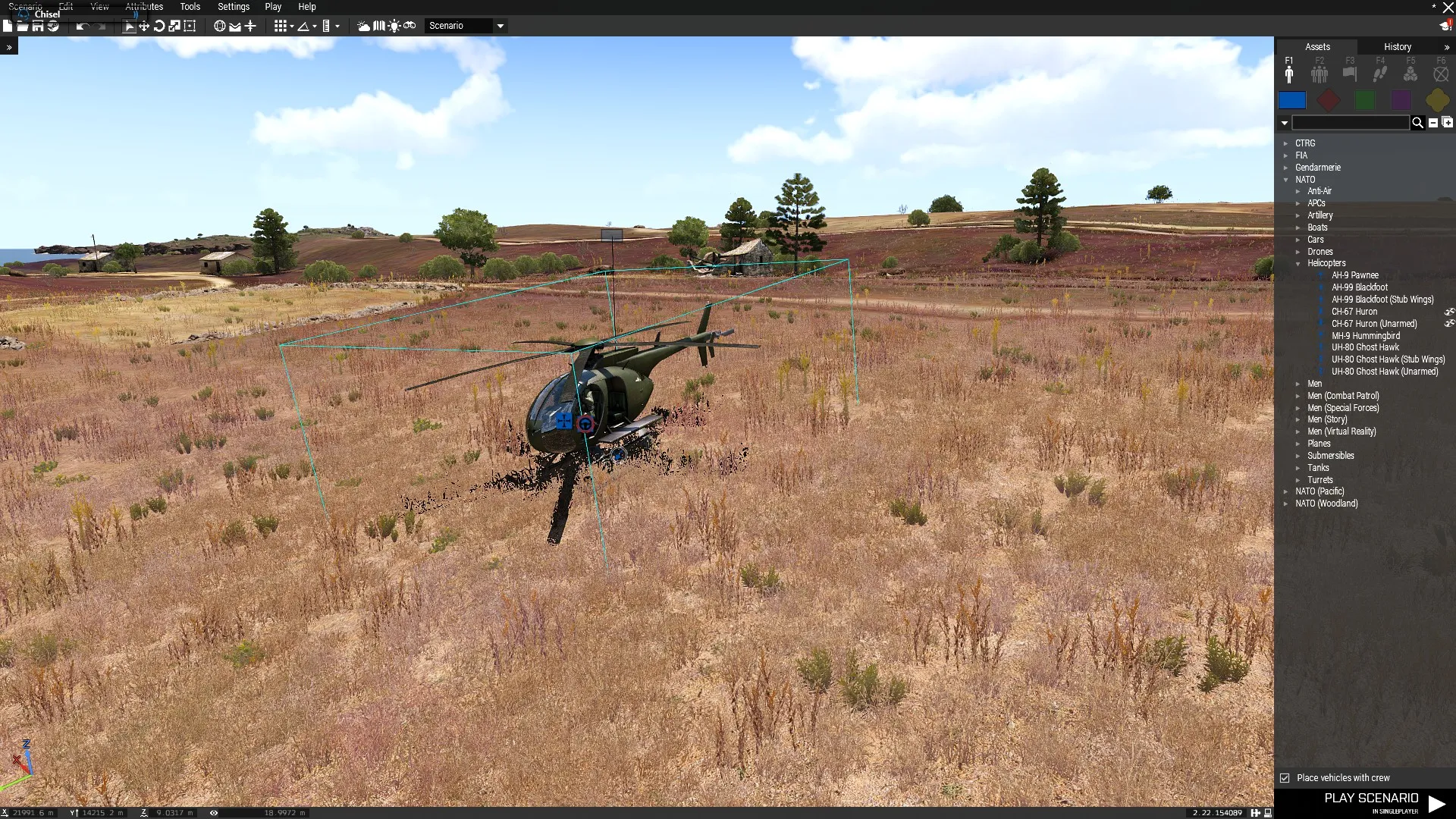 Placing an MH-9 Hummingbird in Eden with “Place vehicles with crew” enabled.
 -
Name the helicopter
myHeliin its object attributes.Double-click the helicopter itself in Eden to open its Attributes window, or right-click it and choose Attributes. Make sure the window title says Edit: MH-9 Hummingbird so you are editing the helicopter, not its pilot. Expand Object: Init if it is collapsed, then enter
myHeli(without quotes) in Variable Name. Leave the larger Init box empty for this tutorial and click OK. This gives the script a name it can use to find your helicopter.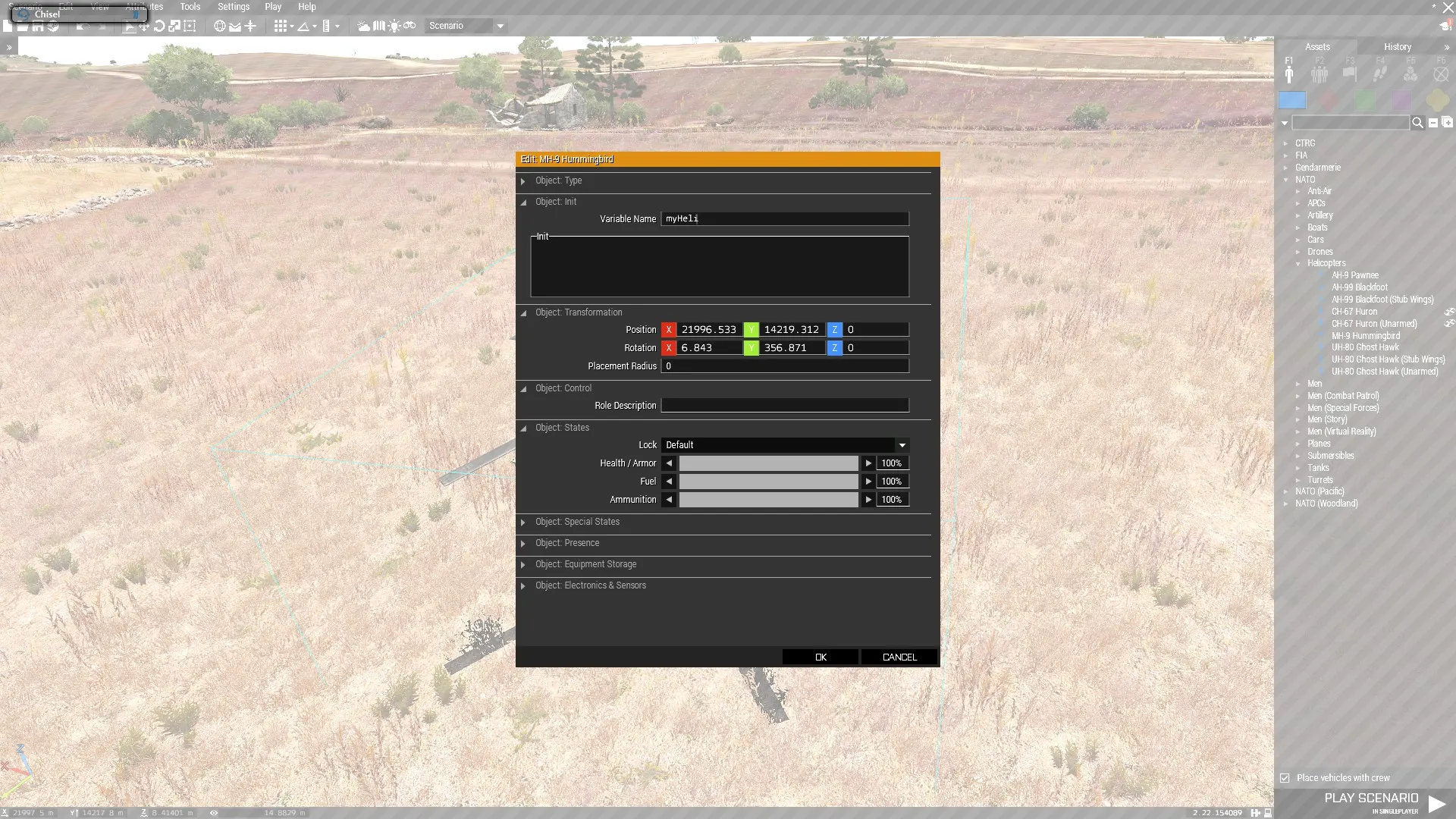 Set the helicopter’s Variable Name to myHeli under Object: Init, then click OK.
 -
Save the mission and create its
init.sqffile.Save your scenario in Eden, then choose Scenario → Open Scenario Folder from the top menu. This opens the mission’s folder in Windows File Explorer. You should see
mission.sqmthere; leave that file alone, as Eden manages it.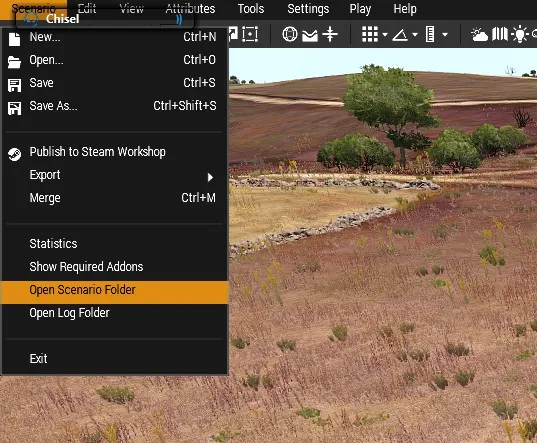 Choose Scenario → Open Scenario Folder to find the folder containing mission.sqm.
Eden does not create
init.sqffor you. Open a new document in a plain-text editor such as Notepad and paste the complete example below into it. Choose File → Save As, navigate to the scenario folder you just opened, and save it asinit.sqfalongsidemission.sqm. In Notepad, select All files in Save as type so it does not add.txtto the filename. Check that the file is calledinit.sqf, notinit.sqf.txt. Save the file before starting the preview; if a preview is already running, stop it and start a fresh one. -
In Eden, choose Play → Play in Singleplayer (SP) to test the mission.
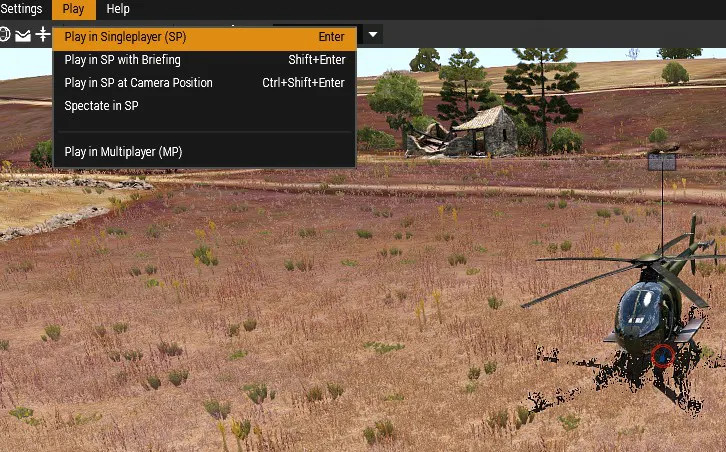 Choose Play → Play in Singleplayer (SP) to start the mission preview.
Once the mission starts, use the mouse-wheel action menu to choose Start Telemetry, fly a short route, and choose Stop Telemetry. Land and move clear of the recorded path before choosing Play Replay.
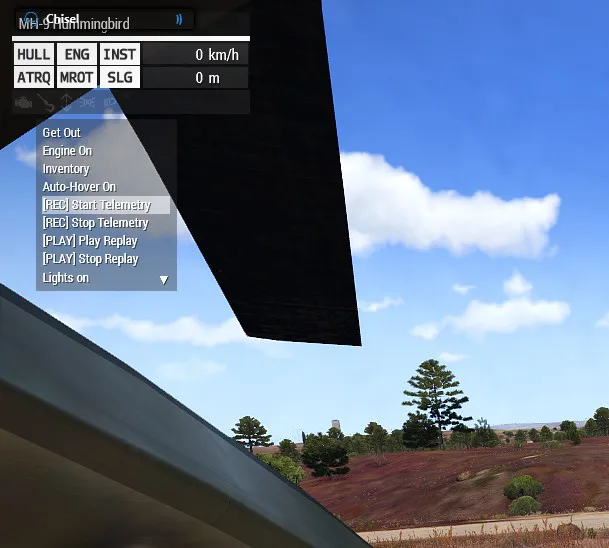 The mouse-wheel action menu contains the recording and replay controls added by the script.
 -
Stop Replay removes the duplicate early. Starting another recording or replay also clears the previous playback.
The actions are added only to the player, so the same controls are available inside or outside the helicopter without duplicate menu entries. This example does not move your camera, so choose a position from which you can see the route.
/*
    Helicopter telemetry and playback teaching example.
    Eden single-player; Arma 3 2.18+; helicopter named myHeli.
    Paste the whole block into init.sqf, not into a unit's init field.

    Read section 3 to see a sample being saved.
    Read section 5c to see two samples being turned into movement.
*/

// 1. SETUP: this demonstration is for a player in single-player only.
// init.sqf can wait; the EachFrame handlers further down cannot.
if (!hasInterface || { isMultiplayer }) exitWith {};
waitUntil { !isNull player };

if (isNil "myHeli") exitWith { hint "Name the helicopter myHeli in Eden."; };
if (isNull myHeli || { !(myHeli isKindOf "Helicopter") }) exitWith {
    hint "myHeli must be a helicopter.";
};

// These REC_ variables are shared by the action buttons and handlers.
// When adapting this, replace REC_ with a distinctive prefix for your project.
// Update every occurrence, including function names and quoted variable keys.
// If several scripts keep REC_, their names can clash with each other.
REC_frames = [];             // The list of saved samples for this flight.
REC_isRecording = false;     // Stops a second click starting another recorder.
REC_recordHandler = -1;      // -1 means no recording handler is registered.
REC_playbackHandler = -1;    // Same idea for the handler moving the ghost.
REC_ghostHeli = objNull;     // Reference to the duplicate, never the original.
REC_heliClass = "";          // The vehicle class to use when spawning the ghost.
REC_startTime = 0;           // Mission time when Start Telemetry was pressed.
REC_lastSampleTime = -1;     // Mission time of the most recent saved sample.
REC_sampleInterval = 0.05; // Target interval, not a guaranteed 20 Hz

// 2. CLEANUP: stop moving the ghost before deleting it.
// This is also called before starting a new recording or replay.
REC_fnc_stopPlayback = {
    if (REC_playbackHandler >= 0) then {
        removeMissionEventHandler ["EachFrame", REC_playbackHandler];
        REC_playbackHandler = -1;
    };
    if (!isNull REC_ghostHeli) then { deleteVehicle REC_ghostHeli; };
    REC_ghostHeli = objNull;
};

// 3. SAVE ONE SAMPLE: called repeatedly while recording.
REC_fnc_sample = {
    // true bypasses the interval check for the first/last sample.
    // It still cannot save a second sample at an identical time.
    params [["_force", false]];
    if (isNull myHeli || { !alive myHeli }) exitWith {};
    private _now = time;
    // A paused mission has not advanced. Do not save the same time twice:
    // playback divides by the time gap and that gap must be greater than 0.
    if (_now <= REC_lastSampleTime) exitWith {};
    // Usually wait until at least 0.05 simulation seconds have passed.
    // If a game frame runs late, keep its actual timestamp, not a made-up one.
    if (!_force && { (_now - REC_lastSampleTime) < REC_sampleInterval }) exitWith {};
    REC_lastSampleTime = _now;
    // pushBack appends one new sample to our list.
    // The numbers below are the array indexes used by playback's select.
    REC_frames pushBack [
        _now - REC_startTime, // 0: seconds since recording began.
        getPosASL myHeli,     // 1: position [east/west, north/south, ASL height].
        vectorDir myHeli,     // 2: direction of the nose.
        vectorUp myHeli,      // 3: direction of the roof (captures bank/pitch).
        velocity myHeli      // 4: movement velocity, in metres per second.
    ];
};

// 4. RECORDING CONTROLS: stop keeps the samples for the Play action.
REC_fnc_stopRecording = {
    if (!REC_isRecording) exitWith {};
    [true] call REC_fnc_sample; // Keep the end sample if time has advanced.
    REC_isRecording = false;
    if (REC_recordHandler >= 0) then {
        removeMissionEventHandler ["EachFrame", REC_recordHandler];
        REC_recordHandler = -1;
    };
    hint format ["Recording stopped: %1 samples.", count REC_frames];
};

REC_fnc_startRecording = {
    if (REC_isRecording) exitWith { hint "Already recording."; };
    if (isNull myHeli || { !alive myHeli } || { !local myHeli }) exitWith {
        hint "The original helicopter must be alive and local.";
    };
    // Stop any old ghost and replace the previous flight's recording.
    [] call REC_fnc_stopPlayback;
    REC_frames = [];
    REC_heliClass = typeOf myHeli;
    REC_startTime = time;
    // Put the previous sample time in the past so the first is accepted.
    REC_lastSampleTime = REC_startTime - 1;
    REC_isRecording = true;
    [true] call REC_fnc_sample;

    // EachFrame offers a chance to record on every render frame.
    // REC_fnc_sample decides whether enough time has passed to save one.
    REC_recordHandler = addMissionEventHandler ["EachFrame", {
        if (isNull myHeli || { !alive myHeli } || { !local myHeli }) exitWith {
            [] call REC_fnc_stopRecording;
        };
        [false] call REC_fnc_sample;
    }];
    hint "Recording telemetry.";
};

// 5. PLAYBACK: finish recording, then create and move the duplicate.
REC_fnc_startPlayback = {
    [] call REC_fnc_stopRecording;
    if (count REC_frames < 2) exitWith { hint "Record at least two samples first."; };

    // Copy the saved list for this playback, so replacing REC_frames later
    // does not switch the flight underneath an already-running replay.
    private _frames = +REC_frames;
    private _first = _frames select 0;
    private _firstTime = _first select 0;
    // Last sample time minus first sample time = length of the flight.
    private _duration = ((_frames select ((count _frames) - 1)) select 0) - _firstTime;
    if (_duration <= 0) exitWith { hint "Recording has no positive duration."; };

    [] call REC_fnc_stopPlayback;
    // 5a. Spawn the same helicopter type and apply its first saved state.
    // createVehicle needs an ATL position here, so convert our ASL value.
    // CAN_COLLIDE allows this spawn position; it does NOT disable collisions.
    private _ghost = createVehicle [
        REC_heliClass, ASLToATL (_first select 1), [], 0, "CAN_COLLIDE"
    ];
    if (isNull _ghost) exitWith { hint "Could not create replay helicopter."; };
    REC_ghostHeli = _ghost;
    _ghost allowDamage false; // Normal damage protection, not collision removal.
    _ghost setPhysicsCollisionFlag false; // Roadway interactions still remain.
    _ghost lock true; // Keep players from boarding the replay helicopter.
    _ghost setFuel 1;
    _ghost enableSimulation true; // Keep normal animation/simulation running.
    _ghost setPosASL (_first select 1);
    _ghost setVectorDirAndUp [_first select 2, _first select 3];
    _ghost setVelocity (_first select 4);
    _ghost engineOn true; // Does not instantly restore recorded rotor speed.
    // Store our bookmark on the ghost so the next frame can read it back.
    _ghost setVariable ["REC_frameIndex", 0];

    // Arma calls this block on EVERY render frame while replaying.
    REC_playbackHandler = addMissionEventHandler ["EachFrame", {
        // Read the values passed in the list at the end of this handler.
        // _playStart is mission time when Play Replay was pressed.
        _thisArgs params ["_ghost", "_frames", "_playStart", "_firstTime", "_duration"];
        // How far into the replay are we? 'max 0' prevents negative time.
        private _elapsed = (time - _playStart) max 0;

        // If something removed or destroyed the ghost, stop this handler.
        if (isNull _ghost || { !alive _ghost }) exitWith {
            removeMissionEventHandler ["EachFrame", _thisEventHandler];
            REC_playbackHandler = -1;
            if (!isNull _ghost) then { deleteVehicle _ghost; };
            REC_ghostHeli = objNull;
            hint "Replay ended.";
        };

        // 5b. Finish safely. A deletion deadline means we are holding
        // the last pose, not playing. Check the clock instead of using sleep.
        private _cleanupAt = _ghost getVariable ["REC_cleanupAt", -1];
        if (_cleanupAt >= 0) exitWith {
            if (time >= _cleanupAt) then {
                [] call REC_fnc_stopPlayback;
                hint "Replay ended.";
            };
        };

        if (_elapsed >= _duration) exitWith {
            // A slow frame may go past the end. Still show the exact final
            // pose, freeze it (including rotors), then wait two seconds.
            private _last = _frames select ((count _frames) - 1);
            _ghost setVelocity [0, 0, 0];
            _ghost enableSimulation false;
            _ghost setPosASL (_last select 1);
            _ghost setVectorDirAndUp [_last select 2, _last select 3];
            _ghost setVariable ["REC_cleanupAt", time + 2];
        };

        // 5c. THE MOVEMENT LOOP: find A and B, work out progress, blend.
        // Use the same time scale as the saved samples.
        private _playbackTime = _firstTime + _elapsed;
        private _index = _ghost getVariable ["REC_frameIndex", 0];
        // A must have a B after it. In a list of 10, the last pair is 8, 9.
        private _lastPair = (count _frames) - 2;
        // Has playback reached the next sample? Move the bookmark forward.
        // Keep going if a slow frame skipped over several sample times.
        while {
            _index < _lastPair &&
            { ((_frames select (_index + 1)) select 0) <= _playbackTime }
        } do {
            _index = _index + 1;
        };
        _ghost setVariable ["REC_frameIndex", _index];

        private _a = _frames select _index;       // Earlier saved sample.
        private _b = _frames select (_index + 1); // Next saved sample.
        // 'select 0' reads the timestamp INSIDE each sample.
        private _span = (_b select 0) - (_a select 0);
        // Time since A / time from A to B = progress through this gap.
        // Example: (12.34 - 12.30) / (12.35 - 12.30) = 0.8, or 80%.
        // 'max 0 min 1' keeps the result within the two samples.
        // The recorder's duplicate-time check means _span is never zero.
        private _alpha = ((_playbackTime - (_a select 0)) / _span) max 0 min 1;
        // Move AND orient the ghost for this render frame.
        // Use the same progress value for position, velocity, nose and roof.
        // This command does linear blending, not quaternion slerp.
        _ghost setVelocityTransformation [
            _a select 1, _b select 1, // Positions (ASL).
            _a select 4, _b select 4, // Velocities.
            _a select 2, _b select 2, // Nose directions.
            _a select 3, _b select 3, // Roof directions.
            _alpha                   // Fraction from A towards B.
        ];
        // On the next render frame, repeat with the new replay time.
        // These arguments carry our private values into the handler:
    }, [_ghost, _frames, time, _firstTime, _duration]];

    hint format ["Playing %1 seconds of telemetry.", round _duration];
};

// 6. ACTION-MENU BUTTONS: add the controls to the player only.
// Player actions remain available inside and outside the helicopter.
// Adding them to myHeli as well would show a second set of menu entries.
// Defining the functions above did not start them; these actions call them.
// isNil { ... } runs these short calls unscheduled, so a frame handler
// cannot interrupt halfway through changing the recording/playback state.
// We are using that execution behaviour, not the true/false result of isNil.
player addAction ["[REC] Start Telemetry", {
    isNil { [] call REC_fnc_startRecording; };
}];
player addAction ["[REC] Stop Telemetry", {
    isNil { [] call REC_fnc_stopRecording; };
}];
player addAction ["[PLAY] Play Replay", {
    isNil { [] call REC_fnc_startPlayback; };
}];
player addAction ["[PLAY] Stop Replay", {
    isNil { [] call REC_fnc_stopPlayback; };
}];
The example stores the helicopter class when recording starts, passes a fixed frame array into playback, and removes the previous playback handler before creating another ghost. This avoids a second click leaving two handlers driving the same vehicle or a new recording changing the data underneath an active replay.
It deliberately stops at a small demonstration: the original helicopter remains in the world,
rotor preparation and recorded damage are not reproduced, and there is no seeking, replay-speed
control, or camera system. CAN_COLLIDE in createVehicle controls placement; the separate
collision flag changes collision behaviour. Neither resolves the remaining roadway and simulation
issues described above.
Use a fresh single-player preview for each session. Save/resume during an active replay is not supported here: Bohemia notes that object references passed through event-handler arguments do not survive game-load serialization. Multiplayer would also need an explicit ownership and synchronization design; a local frame handler driving a globally created vehicle is not enough.
Here’s a short video showing how to load the mission, record a flight, and watch the telemetry replay.
Where to take it from here
A timestamped stream and per-frame interpolation provide a starting point. Before treating the replay as a dependable mission feature, exercise repeated start/stop, pauses, low frame rates, aircraft destruction, and flights near terrain and buildings in Arma itself. Check the script error log as well as the picture on screen.
The trainer’s implementation adds rotor preparation, collision handling around original entities, and several layers of cleanup. Those systems matter as much as the interpolation when the replay has to coexist with a running mission.
From there, additional features include:
- Camera views: Follow the ghost from the landing zone or above the route.
- Flight path ribbons: Draw trails with
drawLine3D, colouring them by speed. - Control inputs: Record cyclic, collective, and pedal inputs alongside the aircraft’s motion.
- Seeking and playback speed: Give the replay its own timeline, with explicit pause handling and efficient frame lookup after a jump.
There is plenty more to explore in each of those. I might come back to them another time.